Arux reimagines how you track family communications

Today's after school and community education programs need to communicate with parents at a high level. More and more, families want to hear from you (and you from them) regarding:
Registration and enrollment: confirmations, acceptance, waitlist status, contract, and schedule change approvals
Payments and billing: invoices, payment confirmations, past-due notices, failed or declined auto pay, collections messaging, receipts
Program operations: schedule change notifications and other account messages, emergency alerts, incident notifications, program updates and logistics, enrollment reminders, marketing for new programs, and general announcements
That's a lot of communications. A thought exercise — consider the communications that your program sent out ten years ago compared to now. We would guess that the number has increased significantly.
A lot of comms go out, so we created a new view to organize them all
As communications increase, it is more important than ever that you can audit what was sent and if parents received and viewed it.
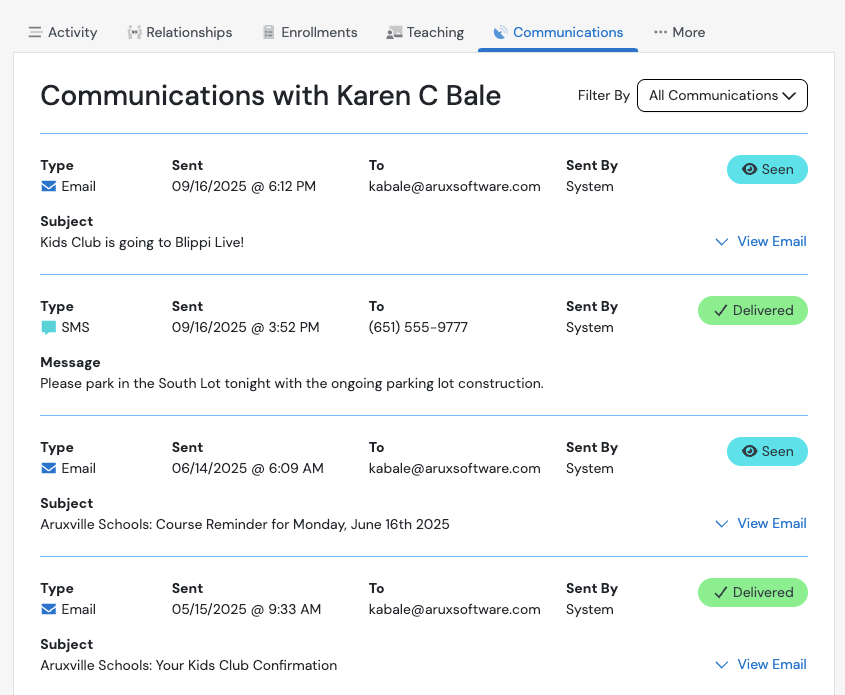
Our redesigned communications tab offers a fresh, intuitive approach to communication management. You can now easily audit and track what's being sent, delivered, and engaged with across all channels, giving you a better way to view everything.
With our new communications tab, admin users can:
View all communications sent (with date and time) to a parent from Arux
Filter messages by date range and see whether it was a system- (automated) or admin-generated email
View tags that signal engagement, including delivered and opened
View the exact communication (text or email) within the same view